
FAQs (Frequently Asked Questions)
Some users may see warnings from their anti-virus software when installing or running VCapDL. These are known as false positive detections.
Modern anti-virus engines sometimes mistakenly flag legitimate software, especially download managers and tools that interact with network traffic or files. This does not necessarily mean the software is harmful.
We do not distribute malware. All releases of VCapDL are built and published from trusted sources and are intended solely for legitimate use.
Before each release, we test our software using multiple anti-virus engines via services such as VirusTotal to ensure there are no widespread or consistent detections. If only isolated or inconsistent flags appear, the release is considered safe.
If you are unsure, you can always verify the file by downloading it only from our official website and checking it with multiple security tools.
What is Smart App Control?
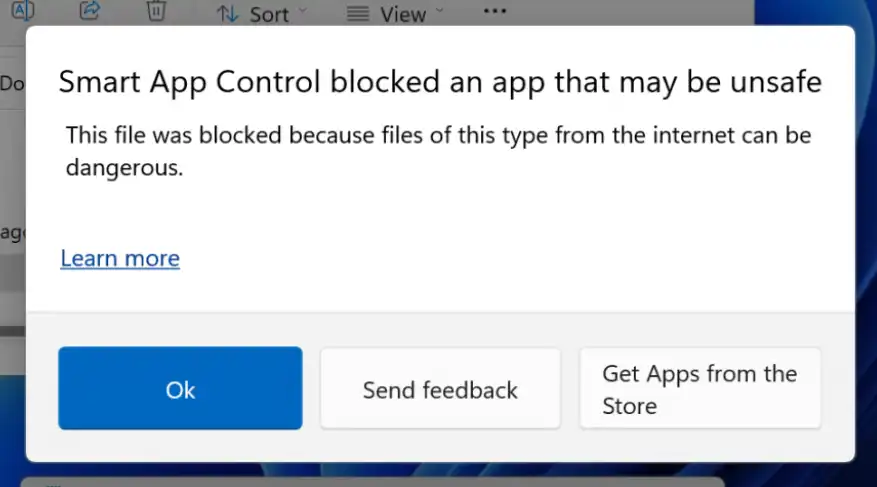
Smart App Control (SAC) is a security feature in Windows 11. It protects your computer from malicious and potentially unwanted software. The feature is powered by Microsoft's cloud-based artificial intelligence.
Why does blocking occur?
SAC blocks files for two main reasons:
- Low reputation: The program is new, has few downloads, and the AI hasn't marked it as safe yet.
- Missing digital signature: The application code is not signed with an official developer certificate.
How does SAC differ from Windows Defender?
They operate at different levels of protection:
- Windows Defender looks for known malicious code. It blocks files only if it detects an actual virus.
- Smart App Control blocks files preventively. It stops programs from running simply because they are "unknown," even if they contain no viruses.
Is a certificate too expensive for a small project?
An official digital certificate (EV Code Signing) is expensive. For small, free projects or indie developers, these costs are often impractical. As a result, creators of useful utilities are frequently forced to release software without a signature.
How to disable or temporarily bypass Smart App Control?
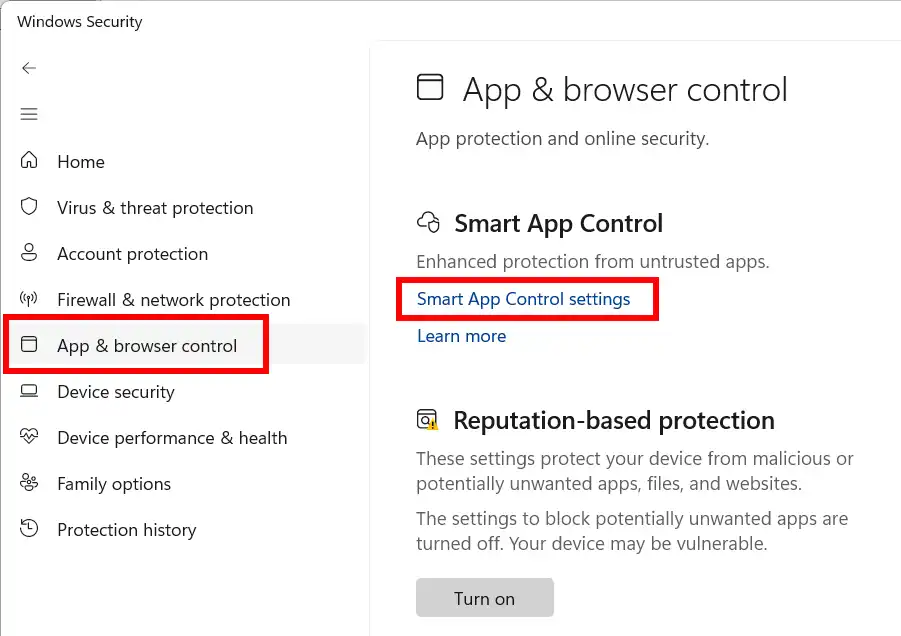
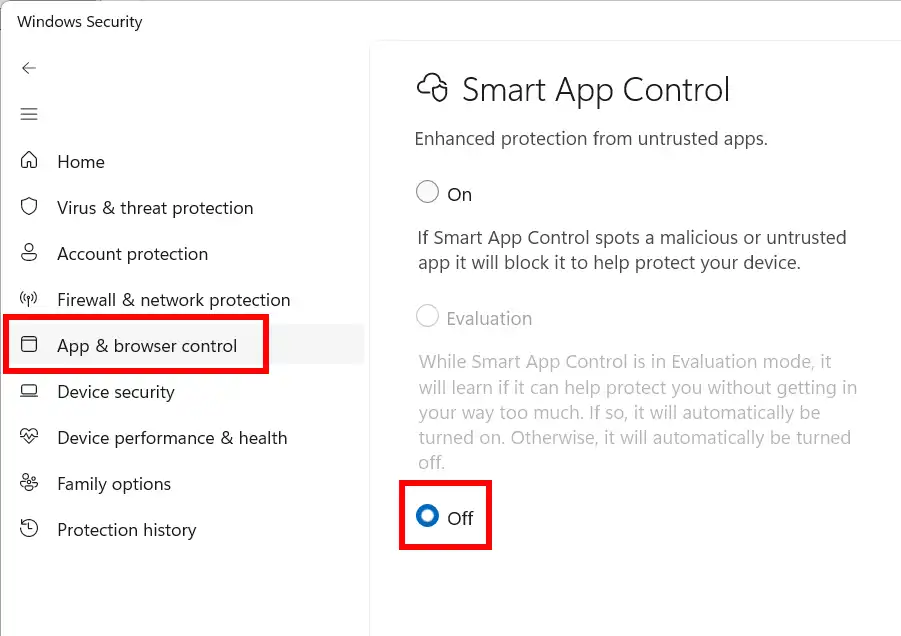
If you fully trust the program, you can disable the protection in your settings:
- Open Settings (Win + I).
- Go to Privacy & security → Windows Security.
- Select App & browser control.
- Click on Smart App Control settings.
- Toggle the switch to Off.
DRM(Digital Rights Management) video protection is a new technology and all subscription sites are switching to it to protect their content.
DRM is a set of access control technologies for restricting the use of proprietary hardware and copyrighted works. DRM technologies try to control the use, modification, and distribution of copyrighted works (such as software and multimedia content), as well as systems within devices that enforce these policies.
Unfortunately, we do not support DRM protection (MPEG-DASH-DRM, M3U8-DRM protocols) now.
Google protects your private data and prevents you from sign-in to third-party applications that it doesn't know about. Here is Google explanation of this behavior https://support.google.com/accounts/answer/7675428.
There is a life hack with which you can download videos without Google sign-in. You must use https://tube.cadence.moe/ service. Go to this site and enter the YouTube video link in the invitation. For example:

VCapDL is able to download YouTube playlist or channel.
A link must have a specific playlist tag for playlist, for example https://www.youtube.com/playlist?list=PLlTUiXJp6aPTo1PapekhJu009PRAK2KQ1, or for user, for example https://www.youtube.com/c/VIDEOVIDEO/videos, or for channel, for example https://www.youtube.com/channel/UCchanneltag.
Paste YouTube url into Start here field and click on the button Parse.

Select video items and select video quality, audio type or subtitles.

Click Download button. Now VCapDL will move the selected video to Download list and start downloading.

In some cases, there may be noticeable desynchronization of audio and video streams. This could be due to a variety of reasons, such as:
- the site owning the video can insert additional AD snippets into the video stream that VCapDL knows nothing about;
- used unsynchronization as an element of download protection;
To eliminate these first two reasons you can try to independently synchronize sound relative to the video. To do this, select from context menu Shift Audio Track item, add a negative value of the audio delay if the audio is lagging behind the video stream or positive value if the audio is ahead of the video stream. Please note that time is set in milliseconds.

Recommended to select Create a new synchronized file in the current folder radio box so that you do not spoil the original file in case of an incorrectly selected delay time. A new synchronized file is created with the addition of the suffix .syns in the same folder as the original file.
- a synchronization error when VCapDL merges hundreds of streaming files;
VCapDL has two ways to convert video files: using FFmpeg.exe, an external widely-known popular video processing project and the internal antMpg.dll module. In some cases FFmpeg.exe does a better job for video conversion, in other cases antMpg.dll does it better. Try switching the conversion method to the opposite and downloading again.

- other reasons.
Unfortunately, this is a current problem that cannot always be solved efficiently.
This error occurs because your current FFmpeg binary was compiled without support for the libx264 library due to licensing and patent restrictions:.
- License Conflict: FFmpeg defaults to the LGPL license, while libx264 is strictly GPL. To avoid forcing the entire project under the restrictive GPL license, official builds exclude it by default.
- Patent Risks: H.264 technology is patent-protected. Distributing pre-compiled binaries with this codec requires royalty payments, creating legal risks for distributors in regions like the US and EU.
We ask that you please provide a reason for the return so we can further improve our products. If our support team has not been able to resolve your issue or if you are not satisfied with our product or support, simply contact us [email protected] within 30 days of purchase and we will refund your money.
More about our Warranty and Refund Policy see Our Policy.